What is the best way to build an AI glyph ideation tool?
About
GlyphGen is an experimental interface for AI-assisted glyph ideation. It helps designers generate single-character glyph directions, compare options, and refine promising outputs through a combination of natural-language feedback, interface controls, branching history, and vector editing.
I started the project after building a graduate thesis framework on computational creativity in glyph design. That framework was useful as a research system and backend architecture, but it was not designed as a tool for designers. GlyphGen was my attempt to turn that framework into a designer-facing workflow for early type ideation.
Starting point
The designer needs to explore design directions, keep track of what changed, compare alternatives, and make increasingly specific decisions as the form develops.
This system should support two different parts of the design process:
- Fast exploration — using AI to generate many possible visual directions quickly.
- Granular control — giving the designer ways to narrow, adjust, and directly edit the output once a direction becomes useful.
Navigating those two modes became the main focus of the interface.
The problem
AI generation is useful for early ideation because it can produce a large range of visual options quickly. For glyph design, that can help designers test and explore without having to draw each option from scratch.
However, a text-to-image model might generate an interesting “serif A,” but a follow-up prompt can easily restart the direction instead of preserving the useful parts of the previous result. For type design, that matters because small formal differences carry the whole personality of the face. It also is too contraining to only use language to get to the next iteration.
Research inputs
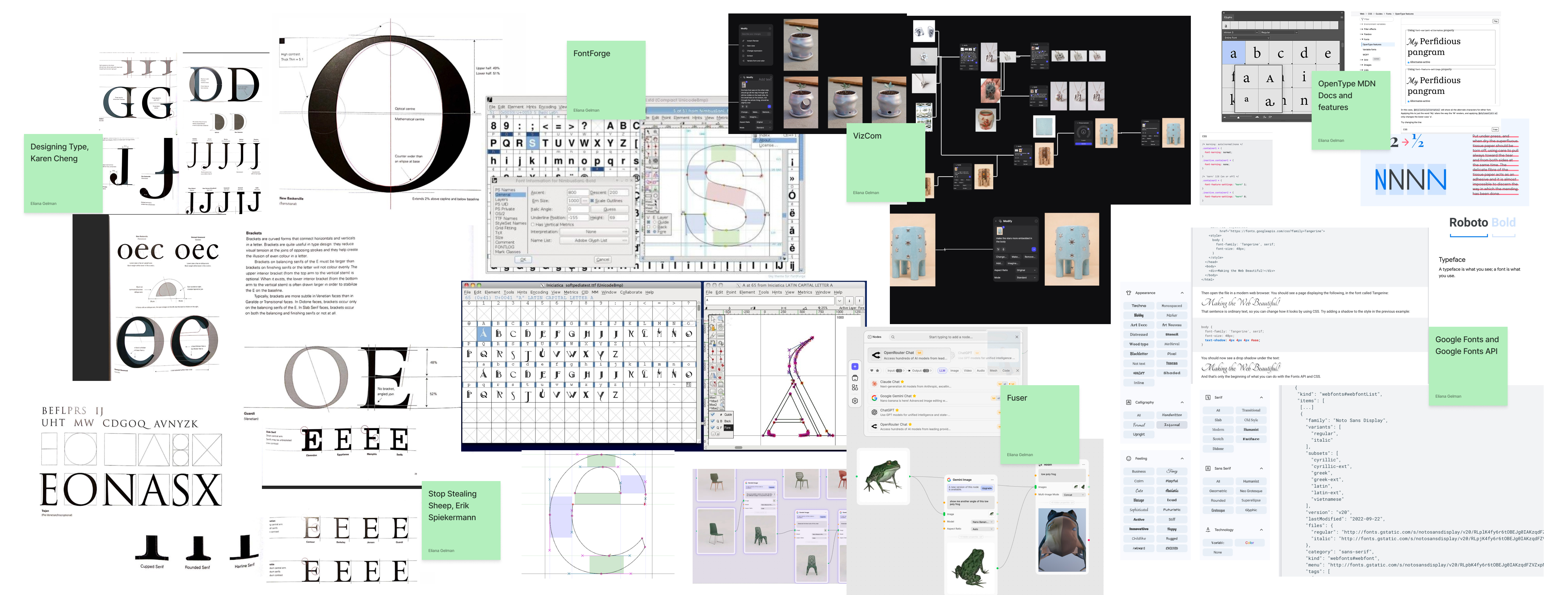
The research for GlyphGen came from three areas: type design, font technology, and AI-assisted visual tools.
OpenType and Google Fonts
I looked at how glyphs are described and adjusted through formal qualities: genre, weight, width, contrast, slant, crossbar position, apex shape, counters, terminals, serifs, joins, roundness, and overall expression.
Font production and FontForge
I also looked at fonts design software, which focus on structured systems of type. The current prototype focuses on single-character ideation, but that research affected the direction of the interface. A generated raster image can be useful as a visual starting point, but it is not enough for type design. The tool needs a path toward editable vectors and eventually toward font-system thinking.
AI-assisted design tools
I looked at tools like Fuser and Vizcom as references for fast visual iteration in creative and technical domains. Those tools were useful interaction references, but GlyphGen needed a more type-specific control model. General visual iteration can often stay at the image level. Glyph design eventually needs control over anatomy, outlines, and formal consistency.
Design goals
I set three goals for the prototype.
1. Support broad exploration
The tool should make it easy to generate multiple glyph directions from a brief, reference, or structured description. At the beginning of the process, the designer should not have to know exactly what they want.
2. Preserve design intent across iterations
When a candidate is promising, the designer should be able to continue from it instead of starting over. The system should preserve the prompt, structured spec, generation settings, scores, references, and parent history behind each candidate.
3. Provide different levels of control
Not every design decision should be made through the same input method, and designers often have various degrees of knowing what their expected output is. The interface needs to support the range of design actions instead of forcing every revision through a prompt box.
The interaction model
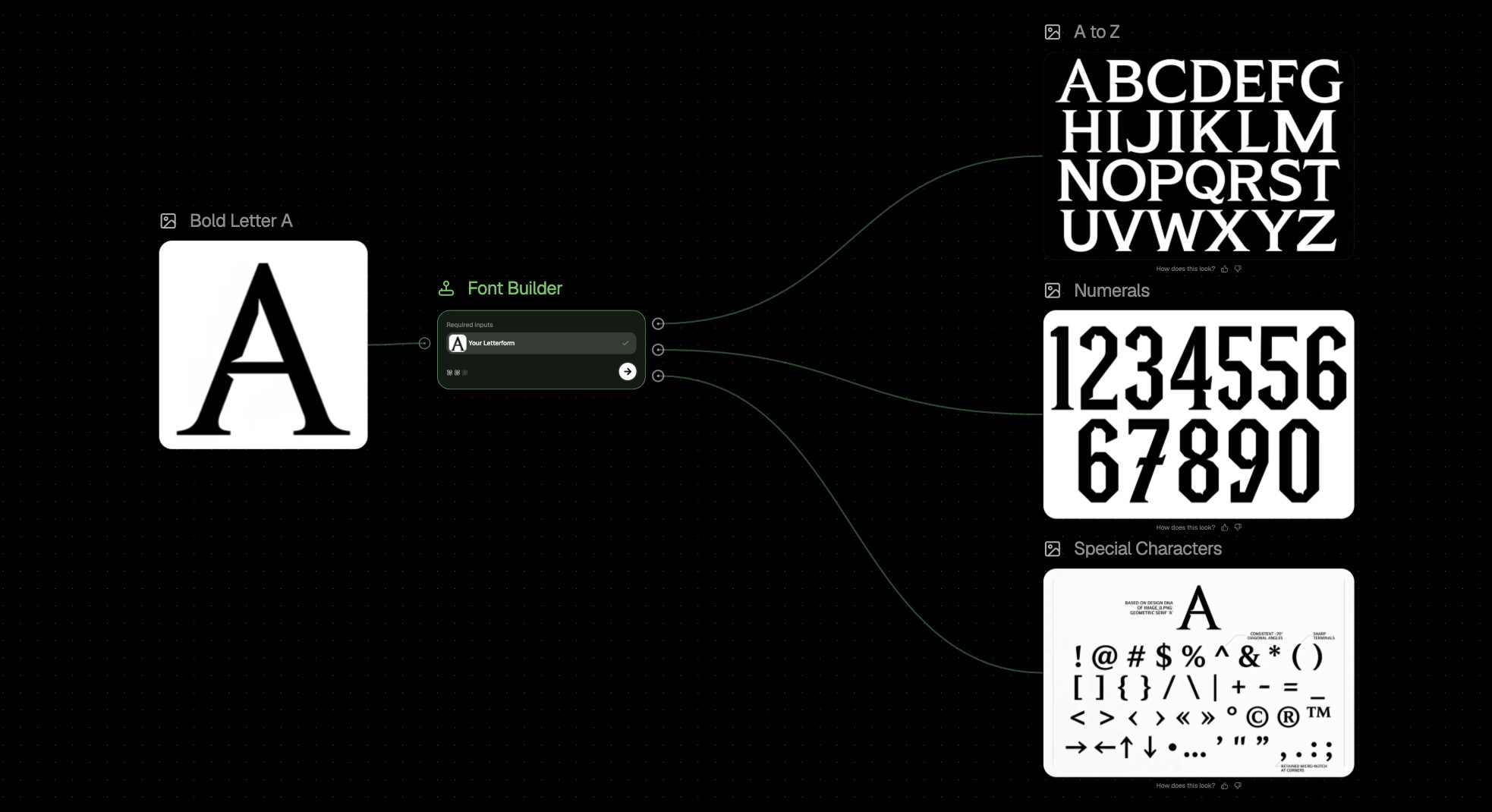
I designed GlyphGen as a node-based workflow for iterative glyph exploration. The basic flow is:
-
01
The designer writes a brief or starts from a visual direction.
-
02
The system turns that input into a structured glyph spec.
-
03
After user approval of the spec, the model generates a glyph.
-
04
Each new generation or edit becomes a branch in the canvas.
Optimizing for outputs that are the most legible to LLMs versus to humans is a difficult challenge to strike. A huge part of this design was finding out how to translate human UI inputs that are the most intuitive to LLM-native language. The next version moved toward an interaction model built around a structured glyph spec, where each glyph and its description could be inspected, edited, and branched.
That structure solved one problem and created another. Overstructuring the descriptions of glyphs is very narrow and results in the opposite dynamic of the expansive ideation you would want with such a tool. For ideation, a designer benefits more from choosing an intent, like display face or reader face, more expressive or more restrained, than from adjusting the internal legibility weighting by hand.
The user stories split into two starting points and four refinement styles:
starts with a clear direction
"I know the kind of glyph I want. Help me generate candidates that match it."
starts without a direction
"I want the model to ideate first. I will react, select, and refine."
"make the terminals feel softer, but keep the weight" or "make it slanted"
Useful when the designer knows the specific term: reader/display, contrast, serif behavior.
Useful when the current direction is close enough to keep searching, but not worth editing yet.
Useful when the model gets the concept right but the designer wants craft-level control.
Canvas
The canvas is the main workspace. It shows the design process as a node graph instead of a linear sequence of outputs.
A brief node can be added from the left panel. From a brief node, the designer can:
- generate an editable render plan with Plan & Edit
- render an uppercase A glyph directly
- delete the node
The canvas is useful because glyph ideation is comparative. A designer may want to try one branch that is more decorative, another that is more legible, and another that is closer to a reference direction. The graph makes those alternatives visible instead of replacing each result with the next one.
Beyond Prompting
The main advantage of a platform like this over a textbox generative tool is that there are more means of editing and translating output. Here are some ways to take a next step:
Walkthrough
One walkthrough focused on designing an uppercase A. The goal was to make the model collaboration concrete rather than showing the system as a generic generator.
- The designer writes a brief for a display A: high contrast, sharp structure, expressive but still readable.
- GlyphGen turns that into a structured spec and generates a set of candidates.
- The designer selects the candidate with the strongest silhouette, then chooses a feedback mode.
- For mood-level refinement, they write a custom instruction like “make the apex feel more architectural and reduce the ornamental noise.”
- For formal refinement, they adjust parameters: slightly higher legibility, lower novelty, cleaner counters, stronger contrast.
- For comparison, they branch the selected candidate into two versions: one closer to the original prompt and one closer to the reference direction.
- Once the direction is stable, they can directly edit the vector outline instead of asking the model to guess a tiny correction.
Reflection
Design is not linear and branching and version control are key.
Storing all edits, specs, and images in one canvas helps the user understand the entirety of their exploration. There are various needs at various times for various designers, and the three tirered control helps alleliate some of the issues with plain blackbox generation.